
Test Drive Tracker
Research, UX/UI Design
Test Drive Track is an application developed to facilitate automotive testing for a multitude of car manufacturers, providing real-time access to comprehensive test data.

Project overview
The company behind the TDT app specializes in conducting comprehensive testing across various types of vehicles and vehicle components, covering critical areas such as brakes, engines, tires, suspensions, aerodynamics, and more. Traditionally, the collection of information and data has relied on physical forms, paper documents filled out by testers.
To enhance the efficiency and effectiveness of data gathering and to better serve manufacturers, our objective is to develop a platform where users can seamlessly input, manage, and access data in real-time or on-demand. This platform aims to revolutionize the data collection process, enabling faster decision-making and fostering improved collaboration among stakeholders within the automotive industry.
What needed to be prioritize in this project?
- Identification of users flow maps and their interactions within the platform and with each other;
- Comprehensive understanding of all information necessary for users to effectively perform their tasks;
- Alignment with company strategy: prioritization of obtaining real-time information.
First steps
Our main goal was to really get to know the users involved in the testing. We looked into their profiles, how they interacted with different parts of the system, how they entered data, and their activity on other platforms. We wanted to figure out what challenges they faced and what they really needed in their roles. By understanding all this, we got a good handle on the main issues and insights that users had.
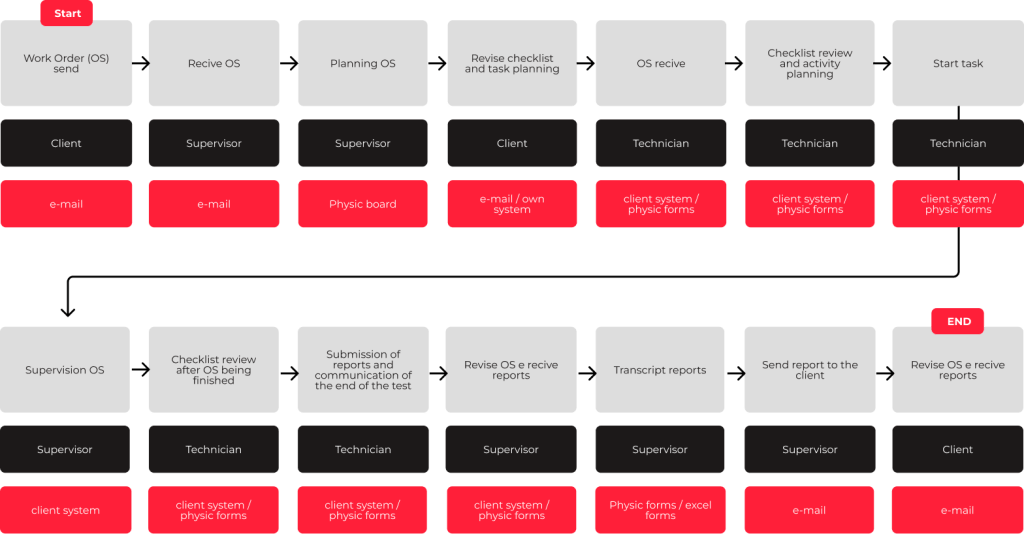
A big problem in the workflow right now is that they’re doing a lot of manual paperwork, which leads to a bunch of tasks getting duplicated. This redundancy requires multiple iterations throughout the process, resulting in delays and ambiguity regarding task statuses for both management and clients.

Personas
As the interviews progressed, it became evident that a diverse range of employees were engaged in the process. Despite this diversity, we managed to categorize them into the following personas.

Pedro
Technician
Needs
• Efficient identification of the person responsible for a specific shift;
• A designated field to describe tests and observations effectively;
• Streamlined reporting of task progress.
Pains
• Time delays caused by recording information on physical forms;
• Lack of a digital record system for tasks;
• Inflexibility of the current system;
• Challenges in presenting comprehensive reports upon task completion.

Raphael
Supervisor
Needs
• A system that provides a clear overview of occupied cells, allowing the requester to visually access available cells.
• Access to a comprehensive history of occurrences for reference and analysis.
• Capability to distribute tasks to different areas efficiently.
• Quick and convenient access to real-time information on ongoing and completed services.
Pains
• System unavailability for all Technicians leading to disruptions in their work.
• Interference of wrong information in the final report, impacting the accuracy and quality of the report.
• Limited flexibility of the current system, hindering adaptability to changing requirements or processes.
• Inadequate control over idle time, resulting in inefficiencies and potential productivity loss.

Carlos
Client
Needs
• Receive timely and accurate data on productivity and progress of tests.
• Implement cost reduction strategies and enhance overall productivity.
• Generate automatic monthly reports to streamline reporting processes.
• Receive concise results without unnecessary details or extensive documentation.
Pains
• Unavailability of an TDT system, hindering the smooth execution of tasks.
• Insufficient availability of data during and at the conclusion of tests, impacting the ability to make informed decisions.
• Delays in receiving reports, resulting in time inefficiencies and potential delays in taking necessary actions.
User flow
Previous Journey
By understanding the user’s previous journey, we could conduct a more thorough assessment of potential improvement opportunities within that journey and how the new application could enhance the user experience.
New Journey
Expanding on our prior comprehension, a significant problem we pinpointed was the dependency on physical forms, resulting in redundant tasks. With a deeper understanding of these inefficiencies, we can now elucidate how the new application simplifies the process. In addition to tackling these aforementioned pain points, we noted that the previous journey was lengthy and complex, causing confusion among users regarding interactions and reporting channels. Through the redesigned journey, not only has it been streamlined, but it’s also more user-friendly, making it easier for each individual to understand their role within the process.

Quick win!
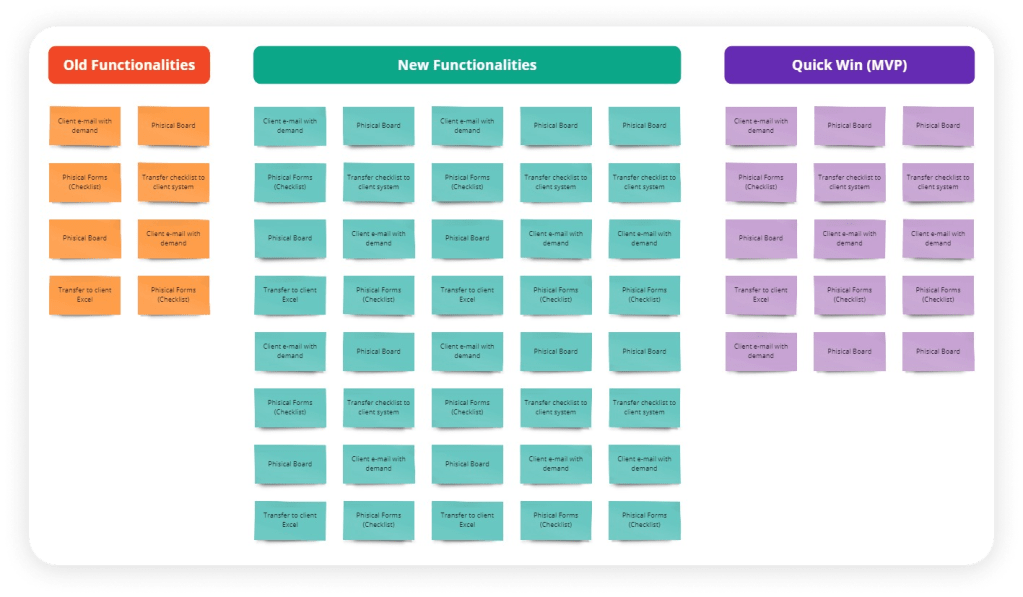
Before diving into new UI designs, we wanted to make sure our ideas were on the right track. So, we held a workshop with stakeholders, sharing all the insights we’d gathered and the outline of the new journey. This helped us tweak the journey to fit the stakeholders’ expectations and needs. We also brainstormed new features to spice things up and improve existing ones.
After brainstorming, we sifted through the ideas to focus on the most important functionalities. This way, we could make sure the app runs smoothly without too much hassle, scoring ourselves a quick win!
Design
Naming and Branding
Now it’s time to start figuring out how we’ll develop the new application. First things first, we needed a name. After some discussion, we settled on “Test Drive Tracker” because it’s simple and straightforward, aligning well with the app’s purpose.
Next up, we needed to create a visual identity along with a logo for the application. We asked stakeholders about their preferences and gathered feedback from users on what they would find appealing. With this information, we came up with a few options, and the final idea looked like this:

UI Design
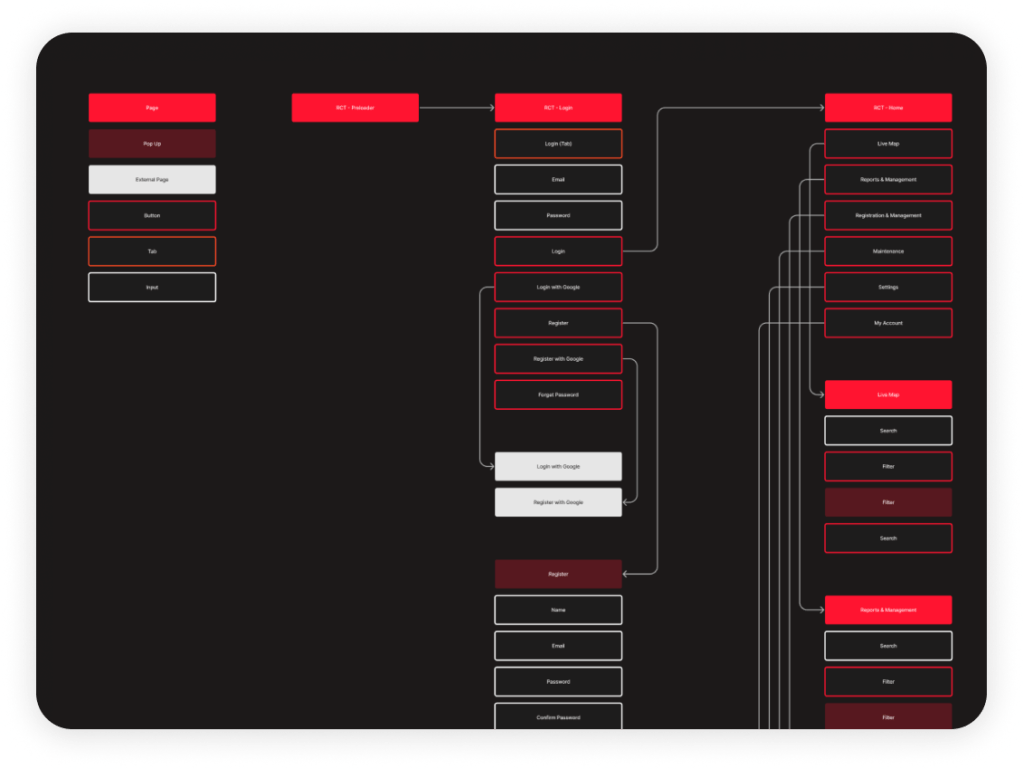
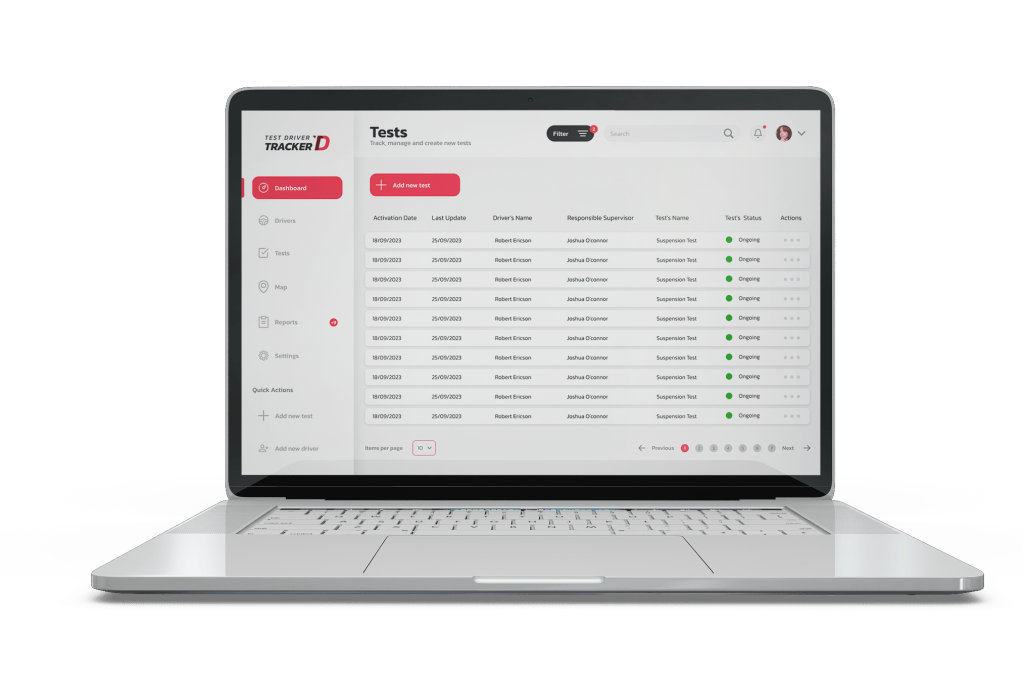
Using benchmarking and our fresh visual identity, we looked at other sites and apps for inspiration. Then, we dove into creating the new UI for TDT. We wanted designs that matched stakeholders’ and users’ expectations but also wowed them with a modern, clean layout. Our aim was to make the user experience as smooth as possible.

Research
After developing the new UI of the application, we conducted some research with stakeholders and users to understand if the new layout met expectations and was truly intuitive for users to use the application. We wanted to understand if the flow was in line or if adjustments were needed.
With that, we identified some minor errors in the journey. Technicians were having trouble inputting all the information needed to complete the tests, and there were also some issues with real-time task management, which was making it a bit difficult for supervisors to work.
Keep improving
Throughout the development process, we remained committed to stakeholder engagement and user feedback. Iterative testing and refinement ensured that the platform met expectations and addressed user concerns effectively.
Upon completion, we conducted thorough testing and validation sessions to ensure the platform’s functionality and usability. Feedback from stakeholders and users informed final adjustments, resulting in a robust and user-centric solution.
Moving forward, we remain dedicated to continuous improvement, innovation, and delivering value to our stakeholders.
 Diana Lunn